

Get your practice number
By Dr Pierre Grobler, Synapp · Last updated 1 June 2026
Everything you need, where to get it, and exactly what to put where.
What a practice number actually is
A practice number — technically a PCN, or Practice Code Number — is a billing code. Not a medical registration. Not a licence to practise. You got those from the HPCSA. A practice number is something separate: it is the unique ID medical schemes use to identify you when you bill them or patients claim from them. Without it, you cannot claim from any medical aid in South Africa.
It is issued not by HPCSA, but by the Board of Healthcare Funders (BHF) through their Practice Code Numbering System (PCNS).
In short: HPCSA lets you practise. PCNS lets medical aids pay on behlaf of your patients.
Before you start: can you apply yet?
One check worth doing before anything else: your HPCSA category. You cannot get a practice number while you are registered under Community Service or any supervised category. Your HPCSA registration must read Independent Practice.
If you have recently finished community service and have not yet changed your HPCSA category, that is a separate HPCSA process — and nothing else on this page will work until it is done.
Where to get the application form
The application is one PDF on the PCNS website. Find it on the PCNS application forms page — pcns.co.za/ApplicationForms.
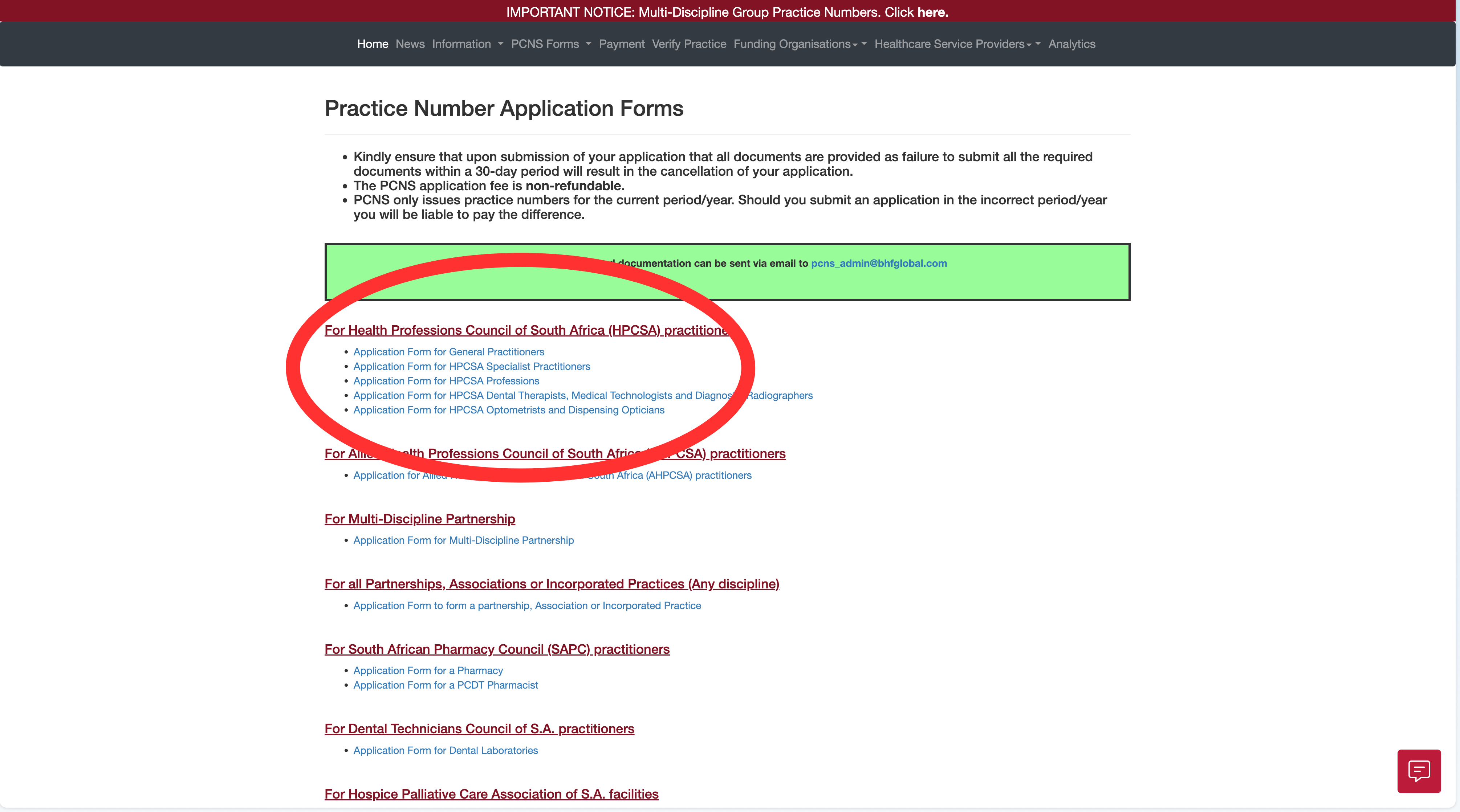
Filling it in
- Practice name. Can be anything — "Dr Pierre Grobler’s GP Practice" works.
- Practice address. Can be anywhere — your home address is usually the most practical if you don't have a separate practice address.
- Banking. as a solo practitioner, no separate business account needed — the personal account you already use is fine.
- VAT number. Only required if you are grossing more than R2.3 million a year — otherwise leave it blank.
- Landline or any field that does not apply. Write "N/A" or just leave it empty. If they have require anything more from you after you've submitted your application, they will mail you.
The document checklist
Seven items in total. Six always apply; the seventh only matters if your name has changed since you registered with HPCSA. The PCNS form itself is the authoritative list — this is that list in plain English.
| Document | Where to get it | Certified? | When it applies |
|---|---|---|---|
| Copy of your SA ID | Your ID document | Yes | Always |
| Registration certificate signed by the Registrar | HPCSA Registrar — phone request | Yes | Always |
| HPCSA Practitioner Card (current year) | HPCSA Practitioner Portal | No — just a copy | Always |
| Stamped bank confirmation letter (≤3 months old) | Your bank | No | Always |
| PCNS Banking Verification Form | Page 4 of the PCNS application itself | No | Always |
| Proof of payment of the PCNS application fee | Your EFT receipt | No | Always |
| Marriage certificate or divorce decree | Department of Home Affairs | Yes | Name change only |
Copy of your SA ID
- Where:
- Your ID document
- Certified:
- Yes
- When:
- Always
Registration certificate signed by the Registrar
- Where:
- HPCSA Registrar — phone request
- Certified:
- Yes
- When:
- Always
HPCSA Practitioner Card (current year)
- Where:
- HPCSA Practitioner Portal
- Certified:
- No — just a copy
- When:
- Always
Stamped bank confirmation letter (≤3 months old)
- Where:
- Your bank
- Certified:
- No
- When:
- Always
PCNS Banking Verification Form
- Where:
- Page 4 of the PCNS application itself
- Certified:
- No
- When:
- Always
Proof of payment of the PCNS application fee
- Where:
- Your EFT receipt
- Certified:
- No
- When:
- Always
Marriage certificate or divorce decree
- Where:
- Department of Home Affairs
- Certified:
- Yes
- When:
- Name change only
Certification has the most specific rules of any step — covered in detail below.
How to get the HPCSA documents
PCNS asks for two HPCSA documents, and you get them in two different ways. The registration certificate has to be the copy signed by the Registrar, which you request from the HPCSA by phone — not the version you download from the portal. The current-year Practitioner Card you download yourself, and the steps further down walk through it.
The registration certificate signed by the Registrar
This is the one document people get wrong, because there are two versions of it and only one is accepted. The certificate you can download yourself from the HPCSA portal is not the document PCNS wants. The one PCNS wants is the registration certificate signed by the Registrar of the HPCSA — a separate, physically signed document that the portal does not produce.
Getting it is easy: phone the HPCSA Client Care Centre on 012 338 9300 and ask, in those words, for your registration certificate signed by the Registrar. There is no charge — they courier it to you for free.
It takes a week or two to arrive, so phone for it early, before you sit down to assemble the rest of the application.
HPCSA Client Care Centre
012 338 9300The current-year Practitioner Card
1. Log in and open Account Overview
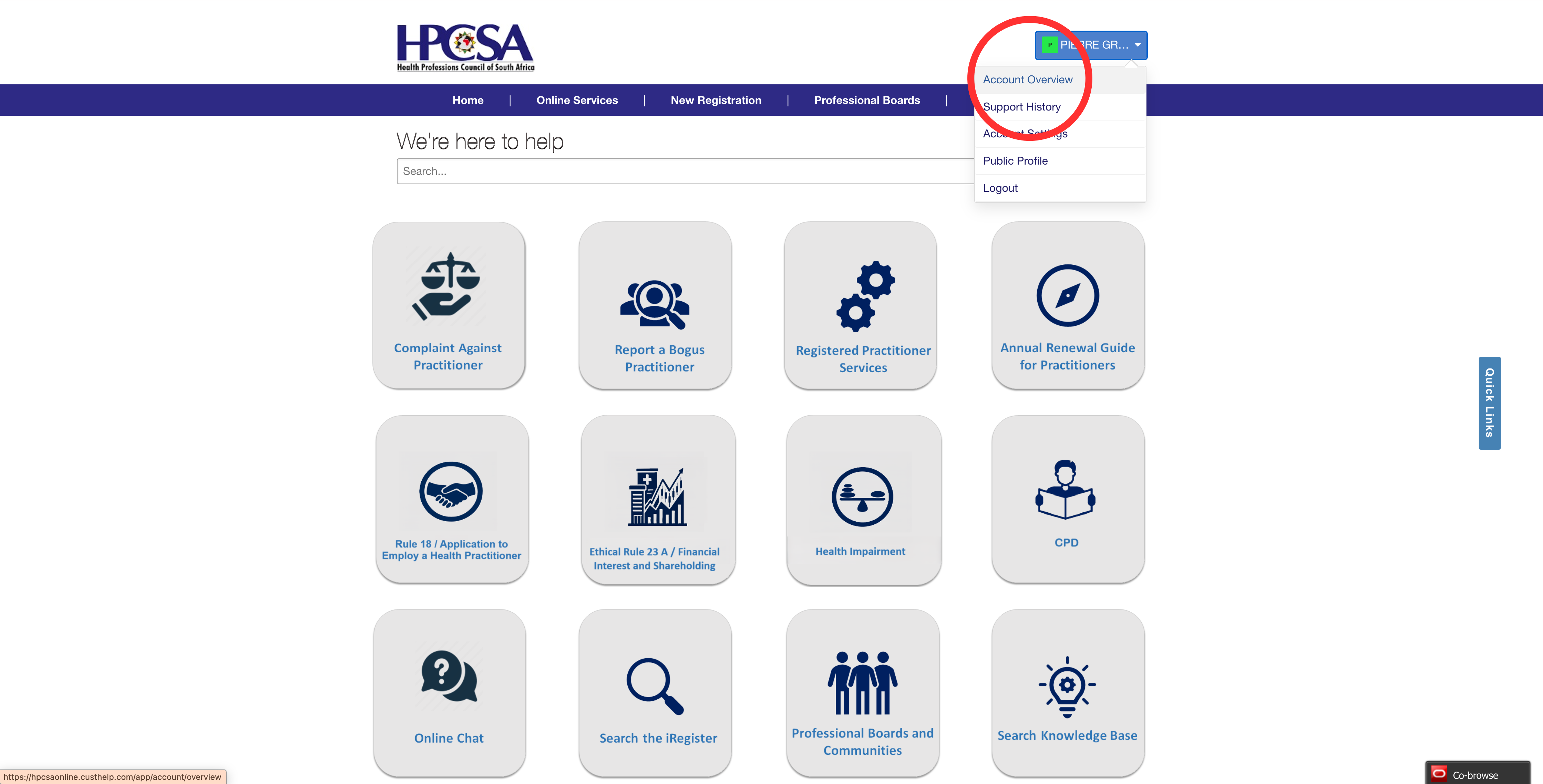
Sign in to the HPCSA Practitioner Portal with your HPCSA council number and portal password. Once you are in, click your name in the top-right corner — a dropdown opens — and click Account Overview. The portal is at hpcsaonline.custhelp.com
2. Open My Registrations
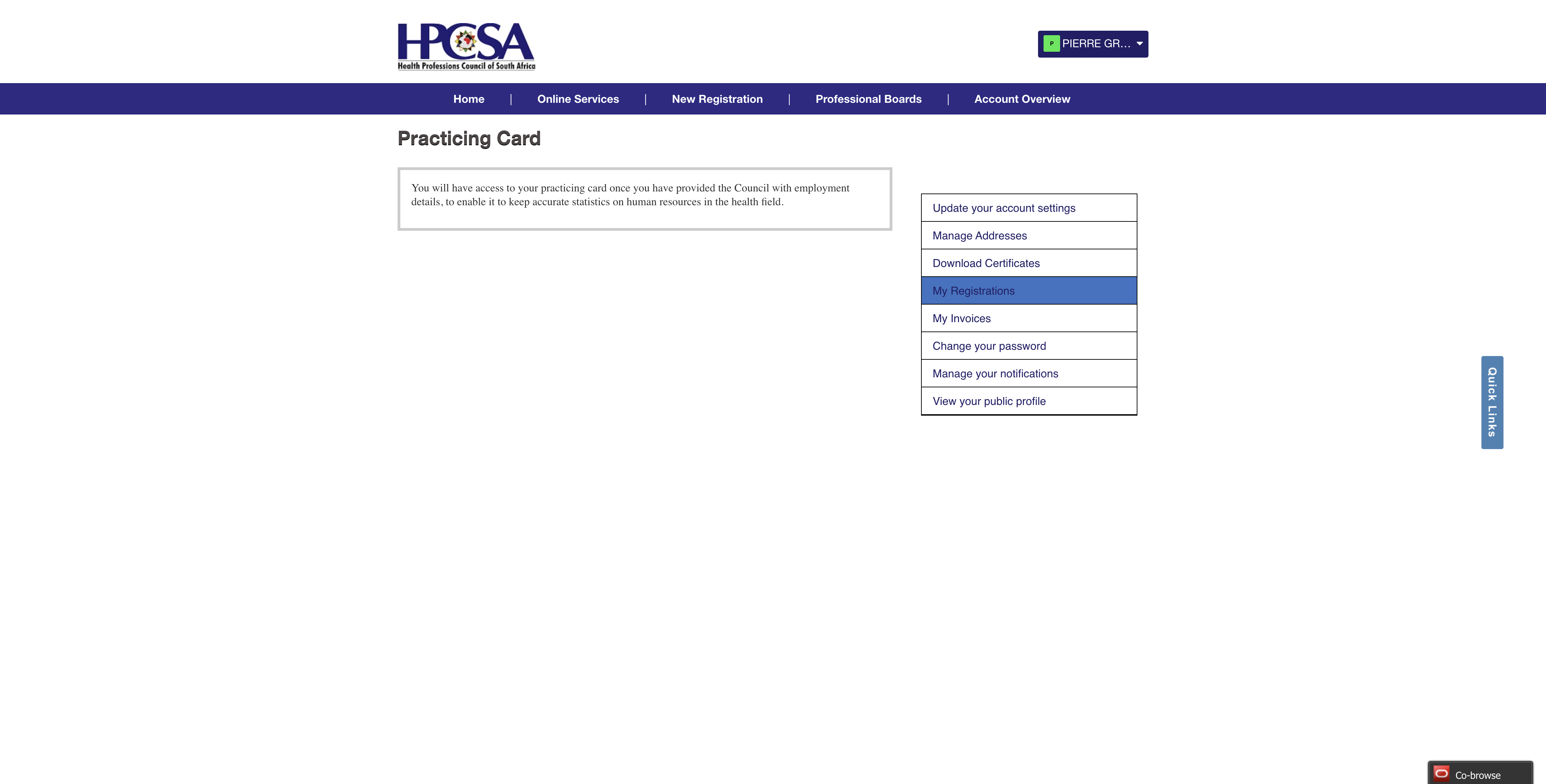
On the Account Overview page, click My Registrations in the side menu on the right.
3. Open your active practitioner registration
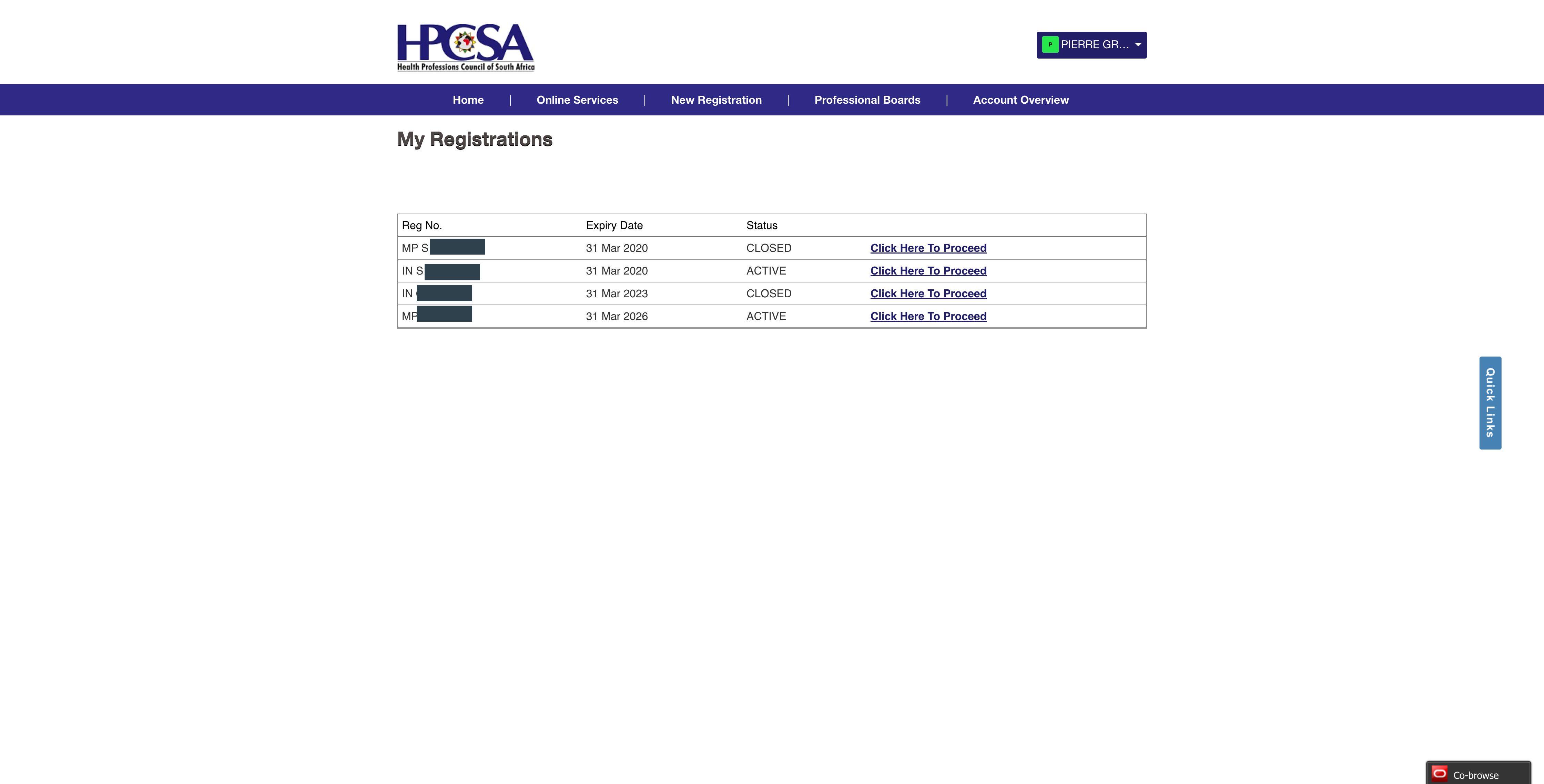
Find your active independent-practice registration in the list and click Click Here To Proceed.
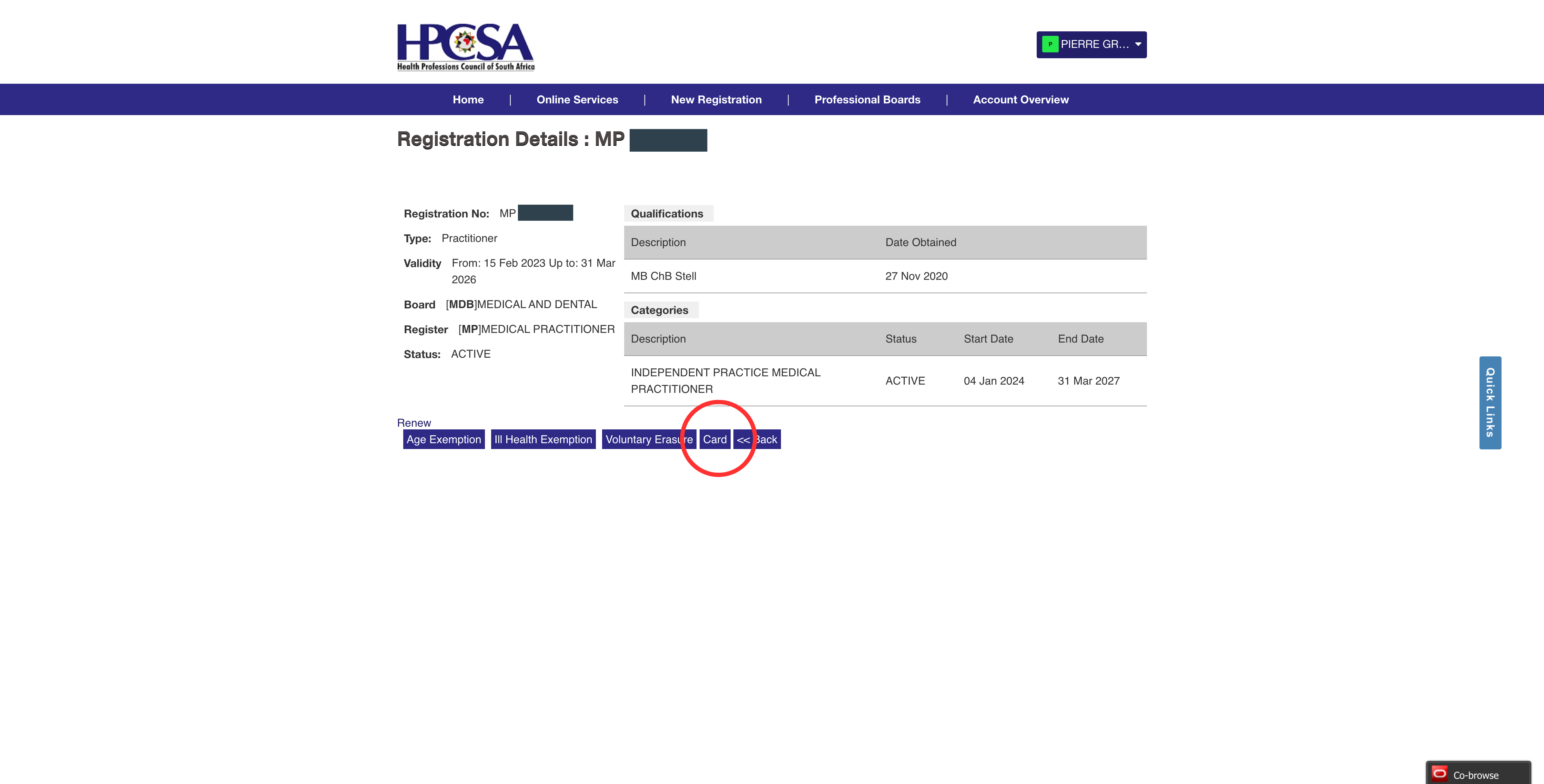
4. Click Card
On the Registration Details page, click Card.
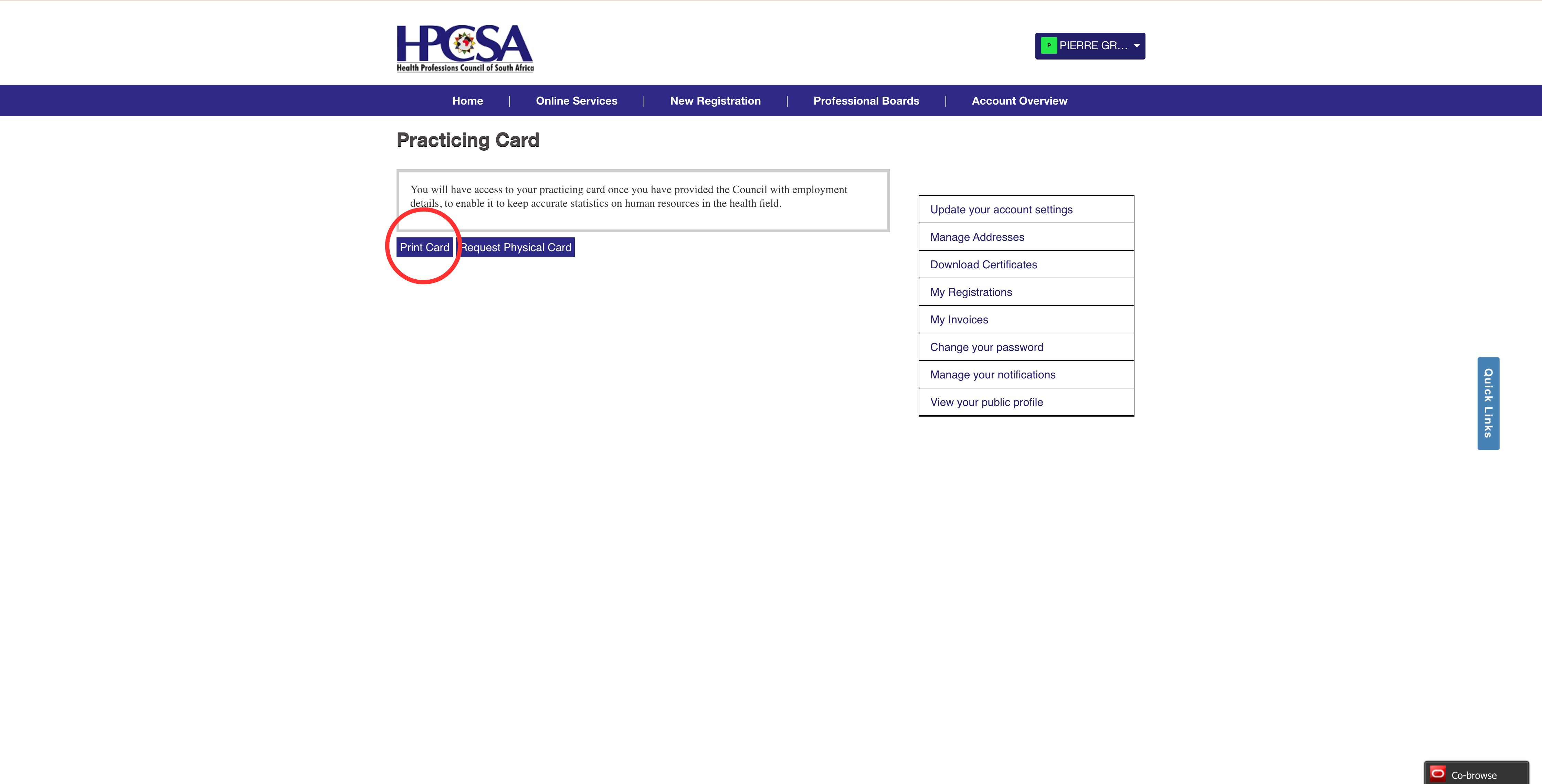
5. Click Print Card
On the Practicing Card page, click Print Card. The card downloads as a PDF.
The bank letter
PCNS wants a letter from your bank confirming your name (as it appears on the account), your account number, and your account type (current, savings, or transmission). It must be on official bank letterhead or carry a bank stamp. A screenshot of your banking app is not accepted.
Every major SA banking app has a way to generate this document — look for names like "bank confirmation letter", "proof of banking", or "proof of account". It usually lives under a services or requests menu; some apps email the PDF directly to you, others require a branch visit.
The letter must be dated within the last 3 months of when you submit your PCNS application, so do not generate it too early.
You will also complete PCNS’s own Banking Verification Form — it is page 4 of the application — using the same details, then sign both the verification form and the practice-owner line.
Where to certify documents
Certification means a Commissioner of Oaths stamps your copy to confirm it matches the original. Three details PCNS is strict about:
The stamp must be dated within the last 6 months of when you submit.
The commissioner cannot be related to you. Not family, not a colleague, not an employee, not your employer. PCNS rejects certifications from any related party.
The stamp must carry the words COMMISSIONER OF OATHS and the commissioner’s name.
Where to go
- Any SAPS police station. Free, no appointment, usually the fastest. Bring the original and the copy.
- An attorney’s office. Attorneys are automatically commissioners of oaths. They cannot legally charge for the commissioning act itself, though some charge an admin fee.
- Post offices. Some branches have a commissioner on site — worth phoning ahead.
- Bank managers. Some qualify, depending on seniority — check with your branch.
- Registered accountants or auditors. Also commissioners of oaths.
Take the original with you. The commissioner compares the original to the copy, stamps and dates the copy, and signs it.
Paying PCNS
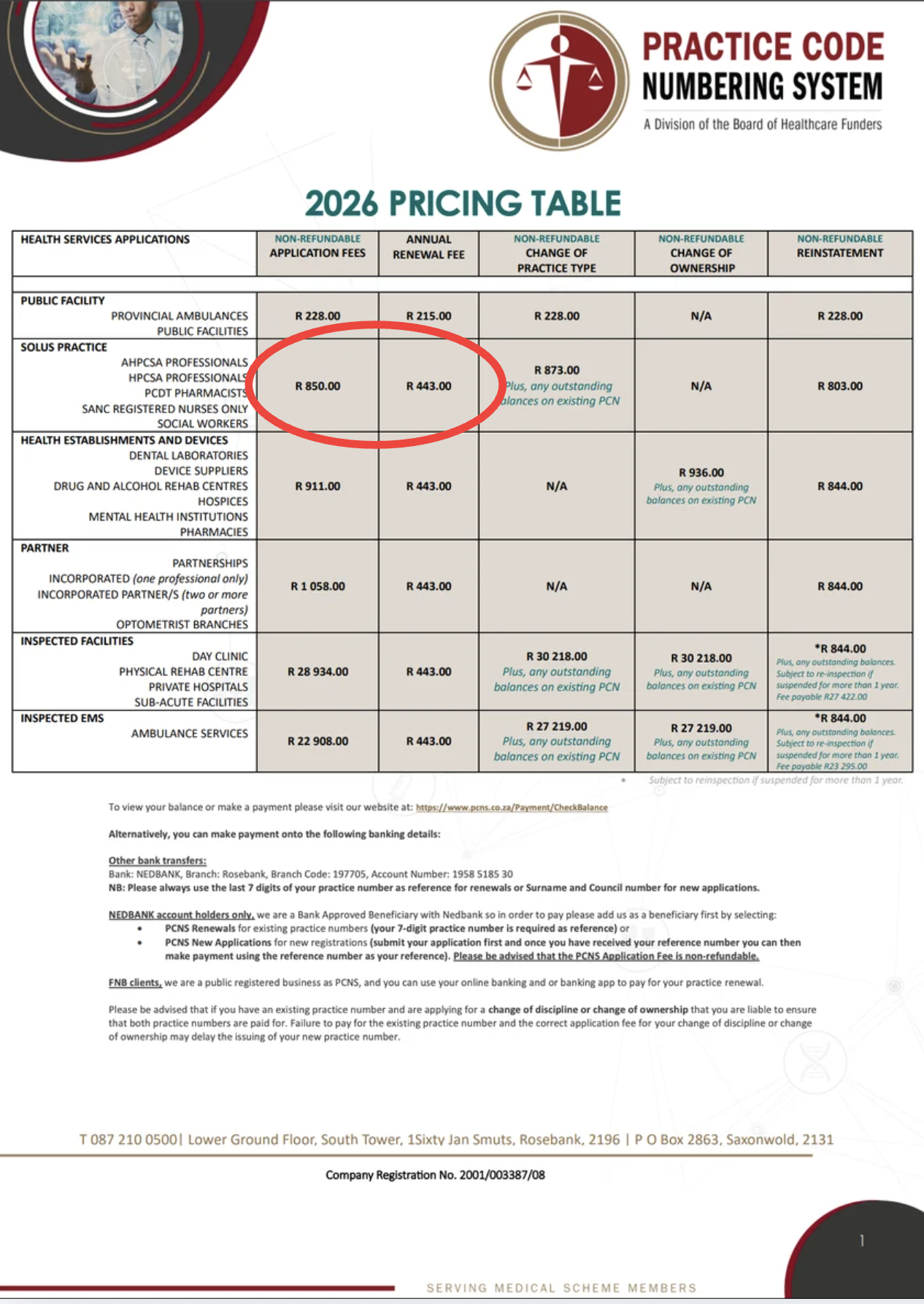
The application fee is non-refundable. If you submit incomplete and the application is rejected, you forfeit the fee — so get every document right before you pay.
For a solo practice in 2026, the schedule is R850 once-off, then R443 per year for renewal after that. Fees change annually, so the live page is the definitive source — pcns.co.za/Home/Fees.
Banking details
- Bank
- Nedbank
- Branch
- The Mall of Rosebank
- Branch code
- 197705
- Account name
- PCNS
- Account number
- 1958 518 530
- Account type
- Cheque
- Reference
- Your surname and HPCSA council number
Nedbank account holders: PCNS is a registered beneficiary on Nedbank’s internal system. You can only submit proof of payment once PCNS has issued you a 5-digit reference number for your application — so draft the application first, then pay.
Keep the EFT receipt. You will attach it to the application.
Submitting your application
Email the completed application form plus all supporting documents (as PDF attachments) to pcns_admin@bhfglobal.com.
What happens next
PCNS verifies your documents. Turnaround is typically 10–20 business days from a complete submission.
The common reasons applications come back:
- Certification stamp expired (older than 6 months)
- Bank letter older than 3 months
- Commissioner of Oaths was related to the applicant
- Name mismatch between ID, HPCSA documents, and bank letter
- Still registered in Community Service at HPCSA
- Proof of payment missing, or EFT reference did not match
- Form not fully completed, or not in block letters
Once it passes verification, PCNS emails you your practice number. That is the moment you become billable to medical aids.
What this guide does not cover
A practice number lets you bill medical aids. Two other admin tasks worth flagging that this guide does not cover:
- Indemnity insurance. Not on the PCNS checklist, but HPCSA expects it and you shouldn’t see patients without it. PPS and MPS are the two common providers in South Africa.
- SARS registration. Once you are issuing invoices, you are running a business. Register as a provisional taxpayer, keep records, and know the VAT threshold (R2.3m turnover in any 12-month period — raised from R1m on 1 April 2026).
Once the number arrives
The PCNS email arrives with your number. From here, the work is making sure it appears everywhere it has to — every invoice, every prescription, every referral, every claim a patient submits.
Make a Synapp account and Synapp handles this for you. Enter your practice number once under your practice details, and every document you generate carries it automatically. No copy-pasting, no manual template updates, no missed claims because the number was left off a referral letter.
Questions
If you find a step this guide does not cover, or a rule has changed and we have not updated this page yet, email me. I read every one. support@synapp.co.za.